![Learnyst Logo-25-1.png]](https://support.learnyst.com/hs-fs/hubfs/Learnyst%20Logo-25-1.png?height=40&name=Learnyst%20Logo-25-1.png)
- To provide a calculator for your students, go to the quiz > Click the "Settings
.png?width=670&height=322&name=pub%20quiz%20(1).png)
- Choose the Quiz Configurations option located below the features.
.png?width=670&height=322&name=ans%20con%20(2).png)
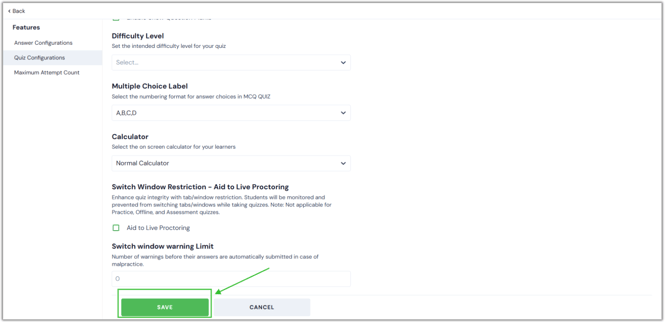
- Once you reach this page, scroll down to find the calculator option. Now click and choose the Scientific or Normal calculator from the drop-down menu.
.png?width=670&height=322&name=calc%20(1).png)
- After selecting the appropriate calculator, click the Save button.