![Learnyst Logo-25-1.png]](https://support.learnyst.com/hs-fs/hubfs/Learnyst%20Logo-25-1.png?height=40&name=Learnyst%20Logo-25-1.png)
-
To book a session, sign in to your learner account and navigate to the Store page.
-
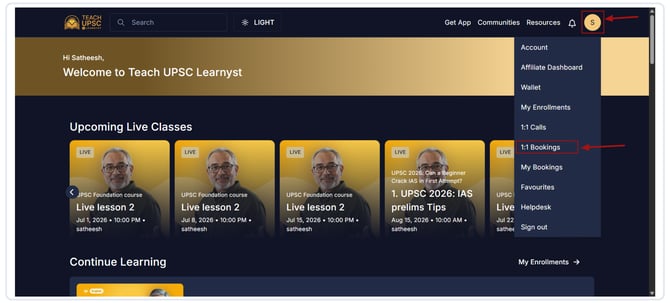
Click your Profile icon and select 1:1 Booking.
-
Browse the available one-on-one tutoring sessions and select the educator or session you want to book.
.png?width=670&height=303&name=Article%20-%201%20on%201%20booking%20(1).png)
-
Click Book a Slot.
.png?width=670&height=303&name=Article%20-%201%20on%201%20booking%20(2).png)
-
Choose your preferred date and time, then click Book a Slot to continue.
.png?width=670&height=303&name=Article%20-%201%20on%201%20booking%20(3).png)
-
You will be redirected to the payment page.
-
Click Pay and complete the payment using your preferred payment method.
.png?width=670&height=303&name=Article%20-%201%20on%201%20booking%20(4).png)
-
After your booking is confirmed, you may be asked to take a Diagnostic Test. This helps the educator understand your current academic level and prepare the session based on your learning needs. You can also skip the Diagnostic test
.png?width=670&height=303&name=Article%20-%201%20on%201%20booking%20(5).png)
-
To attend your scheduled session, click your Profile icon and select My Bookings.
.png?width=670&height=303&name=Article%20-%201%20on%201%20booking%20(6).png)
-
Here, you can view all your upcoming and past bookings. When it's time for your session, click Join Meeting to attend your personalized one-on-one class.
.png?width=670&height=303&name=Article%20-%201%20on%201%20booking%20(7).png)