![Learnyst Logo-25-1.png]](https://support.learnyst.com/hs-fs/hubfs/Learnyst%20Logo-25-1.png?height=40&name=Learnyst%20Logo-25-1.png)
Steps to Change Space Visibility
Step 1: Open the Socials Dashboard
Go to the Admin Dashboard > View As Learner > Socials Dashboard and locate the Space for which the visibility needs to be changed.
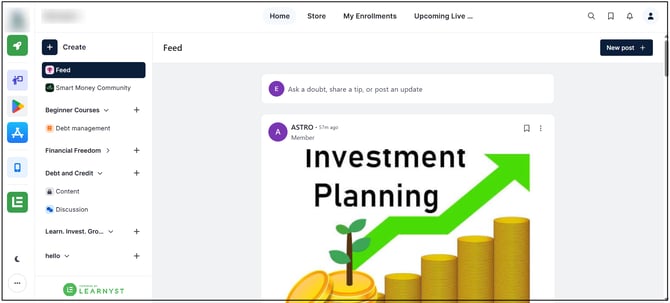
Step 2: Open Space Settings
Click the three-dot menu on the Space and select Settings.
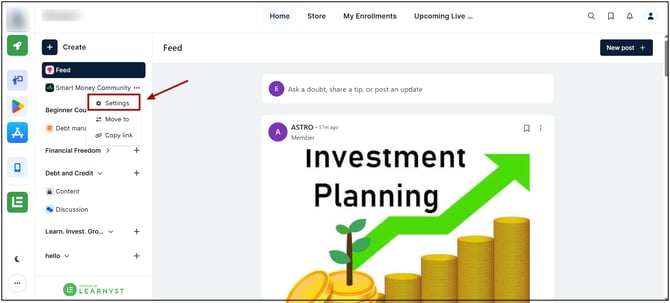
Step 3: Open Visibility Settings
Under the Space settings, select the Visibility section.
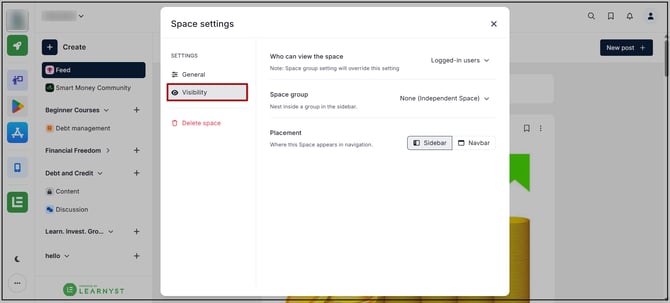
Step 4: Change Visibility
Update the visibility settings to control who can see the Space.
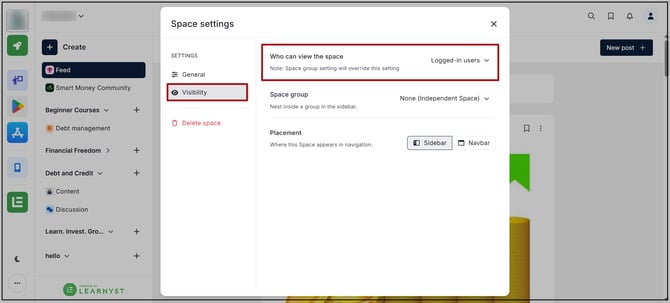
Step 5: Change the Space Group
Select the required Space Group to associate the Space with a different group. and adjust placement also.
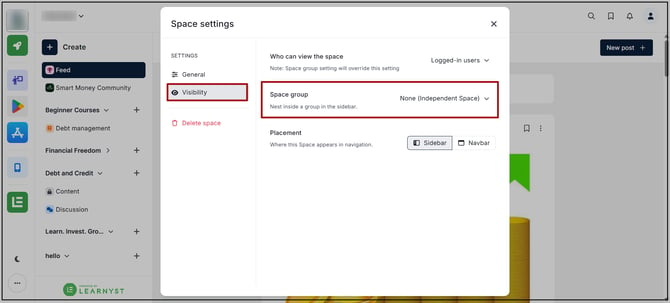
Save the changes to apply the updated visibility and Space Group settings.
The updated visibility setting determines which users can access or view the Space. Users who do not meet the selected visibility criteria will not be able to access the Space.