![Learnyst Logo-25-1.png]](https://support.learnyst.com/hs-fs/hubfs/Learnyst%20Logo-25-1.png?height=40&name=Learnyst%20Logo-25-1.png)
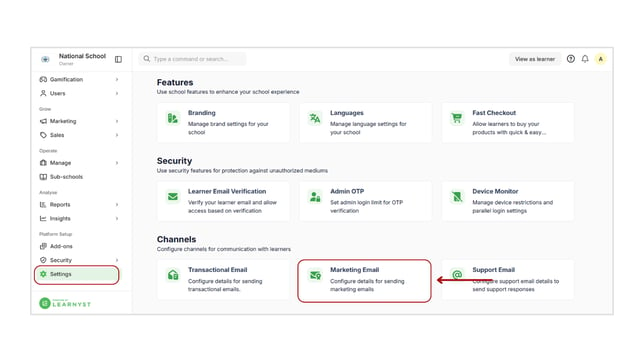
- To configure the marketing email details, please log in as an admin.
- Then choose Settings from the left-hand menu bar.
- You will arrive at the settings page. Scroll down and select the Marketing Email option from the channels.
- Here, you can enter the necessary details for the marketing email.
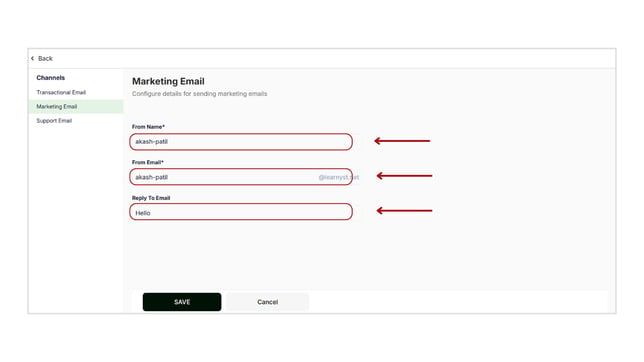
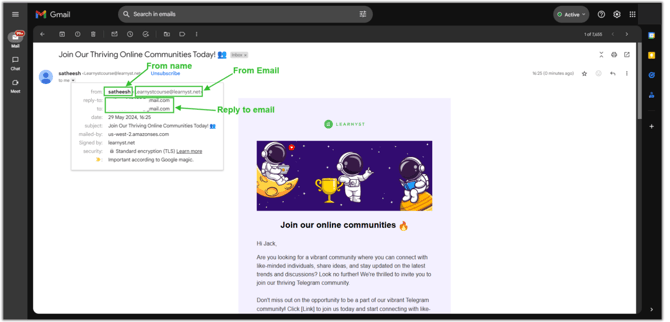
- From name: when you send the marketing mail, your learner will identify this name as the sender.
- From Email: Your marketing email will be delivered to your learner using this email address.
- Reply to Email: If your learner replies to your marketing email. You will receive a reply email in that email account.
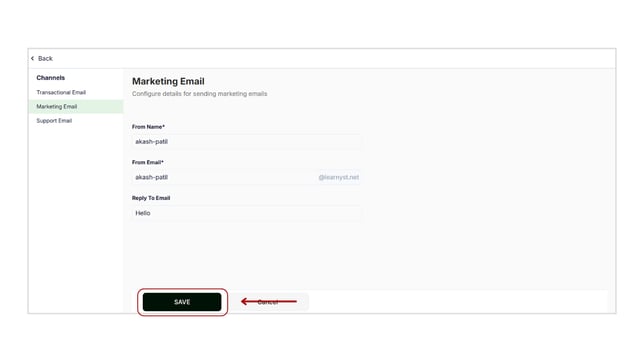
- After you've provided the necessary details, click the Save button.
- Now, your learner will receive your email, as seen in the image below.