![Learnyst Logo-25-1.png]](https://support.learnyst.com/hs-fs/hubfs/Learnyst%20Logo-25-1.png?height=40&name=Learnyst%20Logo-25-1.png)
-
To create a 1:1 coaching session, navigate to Products → 1:1 Coaching from your Learnyst dashboard.
-
Click the Create button
-
Here, enter the Title, Description, and Session Duration. Once you’ve added the details, click Create.
- Now, click the Instructors and then the Add instructors option to choose the instructors for this one-on-one.
- Next, choose the instructors and click the Add button.
- To set up the instructor's availability, navigate to the availability section and choose the instructor.
- You can now Set up the availability. Additionally, instructors and super admins can change the time and date of their unavailability and click "Save."
- After everything is configured, go to Settings to publish a pricing plan, duration, FAQs, and other details.
- Once everything is set up, you can publish the 1:1 coaching.
-
Once the 1:1 coaching session is published, learners can book an available meeting slot.
-
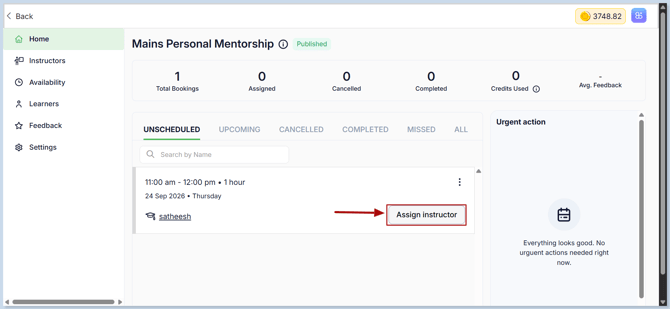
After a learner books a slot, the booking will appear in the Home section of the admin dashboard. Click Assign Instructor.
-
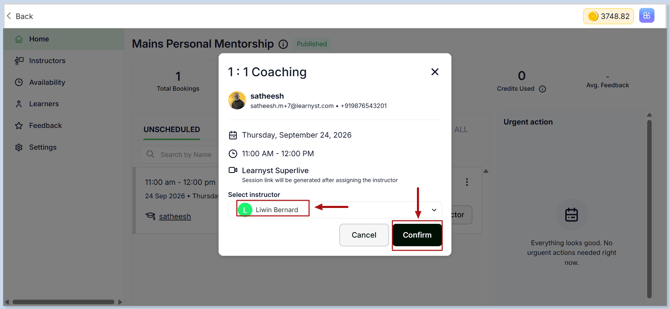
Then, select the instructor who will conduct the coaching session and click the confirm button .
-
Once the instructor is assigned, they can join the meeting 5 minutes before the scheduled start time.
-
Your 1:1 coaching session is now ready to manage, and learners can book available slots directly from your academy.