![Learnyst Logo-25-1.png]](https://support.learnyst.com/hs-fs/hubfs/Learnyst%20Logo-25-1.png?height=40&name=Learnyst%20Logo-25-1.png)
- To create a new course, please log in as an admin.
- You'll arrive at the admin dashboard. Then, from the menu bar on the left, pick Products.
- When you click it, you'll see the term "Bundles" beneath it. Click it.
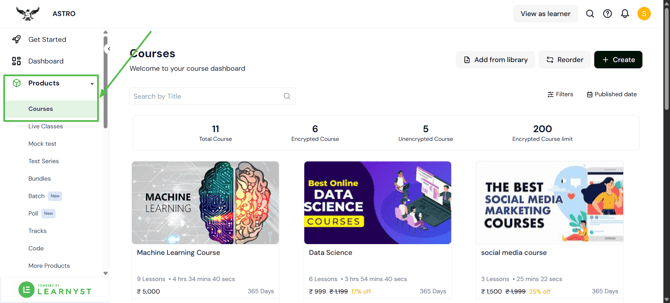
- Click the "Create" button to begin a new course.
.png?width=670&height=322&name=course%20(2).png)
- The course title and price can now be entered on the new page.
.png?width=670&height=322&name=course%20(3).png)
- If you are willing to provide this course for free, simply select "Make this a free Bundle."
.png?width=670&height=322&name=course%20(5).png)
- Then select the Content Security option.
.png?width=670&height=322&name=course%20(4).png)
- Encryption: You can secure your content from piracy and theft by selecting an encryption option. We are utilising cutting-edge DRM technology to protect your data from hackers.
- No encryption: If you select the No encryption option, your content will not be encrypted. Unsecured content is easily downloaded and breached.
- Once you've selected the perfect security solution, click the Create button.
.png?width=670&height=322&name=course%20(6).png)
- You have now built your course in just a few minutes.