![Learnyst Logo-25-1.png]](https://support.learnyst.com/hs-fs/hubfs/Learnyst%20Logo-25-1.png?height=40&name=Learnyst%20Logo-25-1.png)
A Pricing plan enables users to set a price for a course. Prior to publishing a course, it is essential to add a pricing plan. Additionally, users have the flexibility to offer courses with multiple pricing plans.
Here is how you create a Pricing Plan for your Product:- From the Admin Dashboard navigate to Products > Courses.
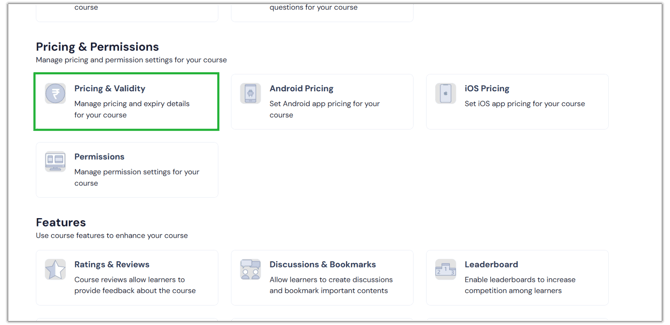
- Navigate to Course Settings and click on Pricing and Validity under the Pricing and Permissions label.
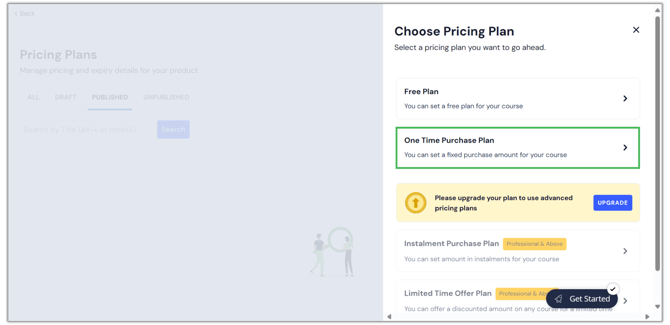
- Click on Add Pricing Plan to add a new pricing plan for your course. Click on One Time Purchase plan.
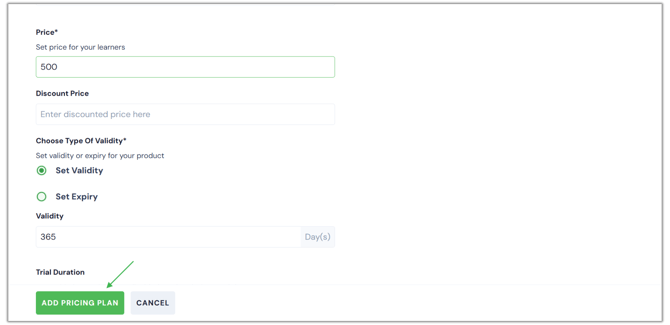
- Enter the relevant details and click on Add Pricing Plan.
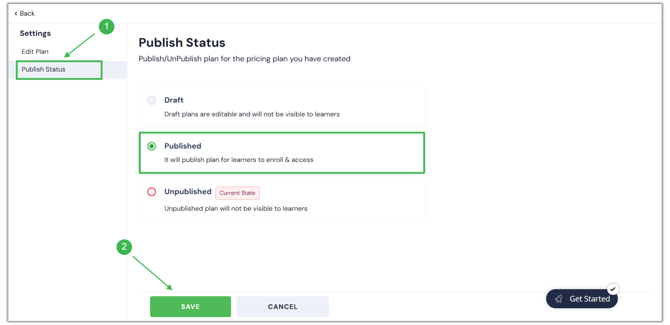
- Once you add the pricing plan, you must publish, for it to be visible to the learners.
-
Once the course is published, the learners will view the sales card of a One Time Purchase plan.
-1.png?width=670&height=325&name=Untitled%20design%20(6)-1.png)