![Learnyst Logo-25-1.png]](https://support.learnyst.com/hs-fs/hubfs/Learnyst%20Logo-25-1.png?height=40&name=Learnyst%20Logo-25-1.png)
-
To customize your 1:1 Coaching notifications, go to 1:1 coaching and click the Desired 1:1 Coaching
-
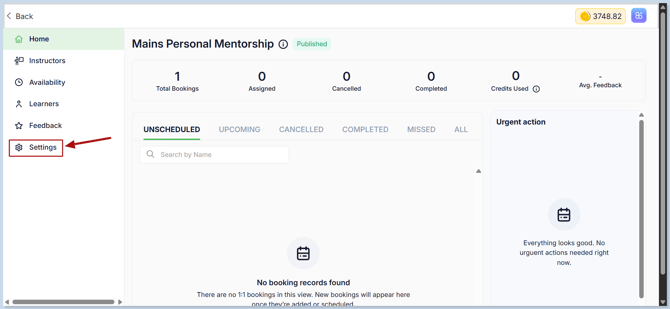
Then click the Settings button
-
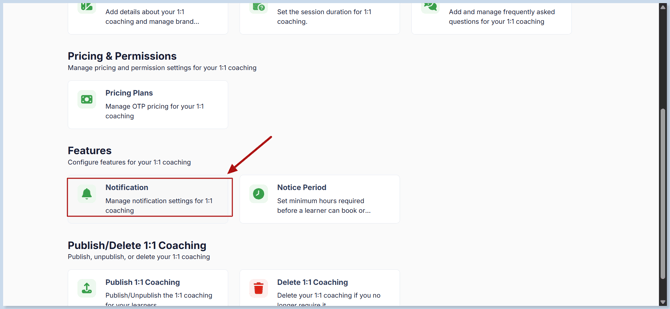
Now click Notifications.
-
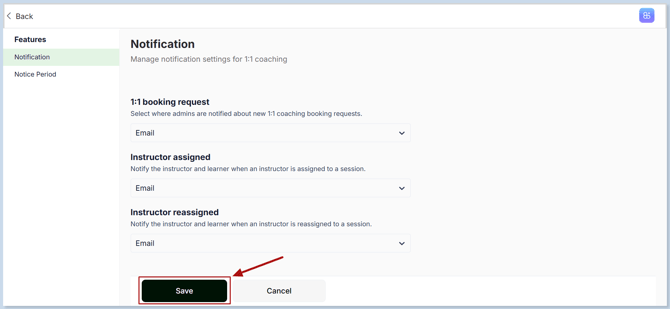
Enable the notification options you want to use and choose how instructors, learners, and admins should be notified.
- 1:1 Booking Request: Select Email if admins should receive an email whenever a learner books a coaching slot.
- Instructor Assigned: Select Email to notify the instructor and learner when an instructor is assigned to a coaching session.
- Instructor Reassigned: Select Email to notify the learner and instructor when the assigned instructor is changed.
- Once you’ve customized the notification settings, click Save to apply the changes.
-
Your 1:1 Coaching notifications are now configured, so the right people can stay informed at every important stage.