![Learnyst Logo-25-1.png]](https://support.learnyst.com/hs-fs/hubfs/Learnyst%20Logo-25-1.png?height=40&name=Learnyst%20Logo-25-1.png)
-
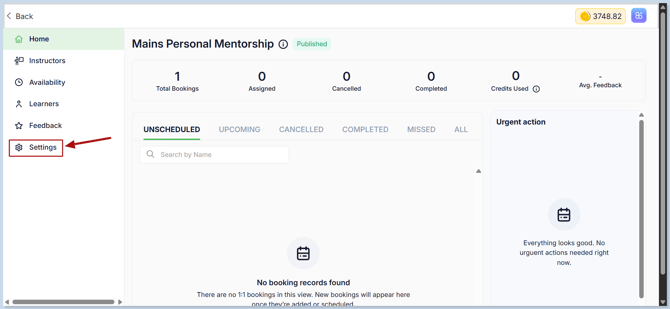
To delete the 1:1 coaching, select the unwanted 1:1 coaching and click the Settings button.
-
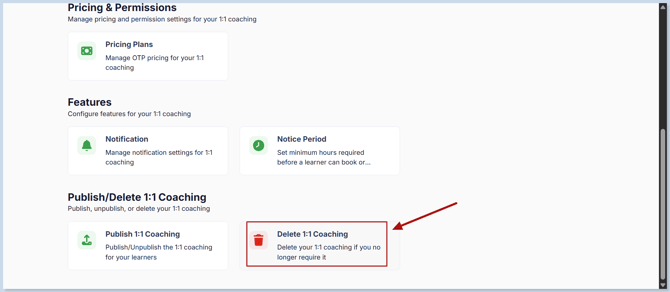
Click the Delete 1:1 Coaching.
-
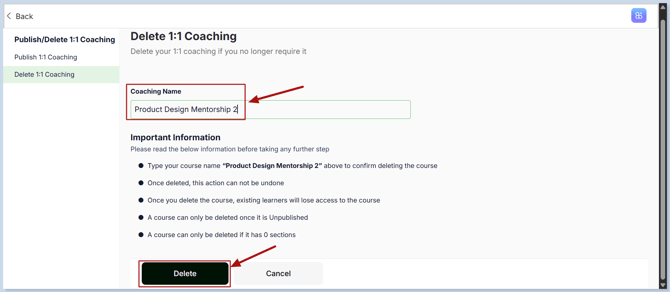
Enter the 1:1 Coaching name exactly as shown in the confirmation field, then click Delete.
Important:
- Deletion is permanent and cannot be undone.
- Existing learners will lose access to the 1:1 coaching once it is deleted.
- The 1:1 coaching can only be deleted after it has been unpublished.
- The 1:1 coaching can only be deleted when it has 0 upcoming session.
- Once deleted, the 1:1 coaching and its associated data will no longer be available.