![Learnyst Logo-25-1.png]](https://support.learnyst.com/hs-fs/hubfs/Learnyst%20Logo-25-1.png?height=40&name=Learnyst%20Logo-25-1.png)
You can delete your product lessons from your digital/custom product in three ways.
First way:
- Go to the Contents > More Products.
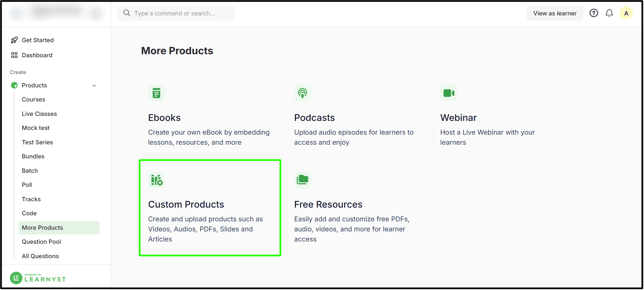
- Select desired digital products.
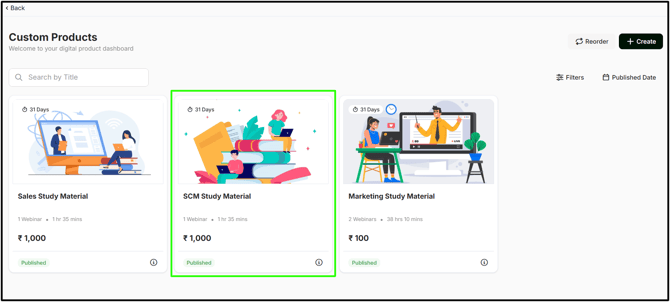
- When you click on your section, you will see the three-dot option in the product lessons. Click on it now.
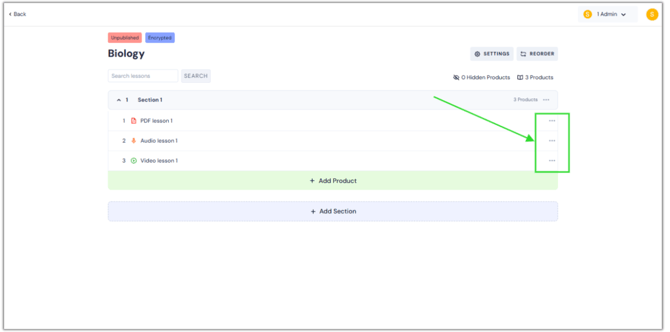
- When you click it, the delete option appears. Press the "Delete" button.
.png?width=670&height=332&name=dele%20les%20DP%20(1).png)
- A pop-up for confirmation is now visible on your screen. Click the Yes, Delete button.
.png?width=670&height=332&name=dele%20les%20DP%20(2).png)
Second way:
- Now, select the product lesson you want.
.png?width=670&height=332&name=dele%20les%20DP%20(3).png)
- Click the Delete button.
.png?width=670&height=332&name=dele%20les%20DP%20(4).png)
- A pop-up for confirmation is now visible on your screen. Click the Yes, Delete button.
.png?width=670&height=332&name=dele%20les%20DP%20(6).png)
Third way:
- Go to Contents > More Products > Custom Products > Select desired digital product > Select the product lesson you want > Click the Settings button.
.png?width=670&height=332&name=dele%20les%20DP%20(5).png)
- By default, you will be in the branding zone. Select the Delete option from the left-hand side of the window.
- Then, press the "Delete" button.
.png?width=670&height=332&name=dele%20les%20DP%20(7).png)
- A pop-up for confirmation is now visible on your screen. Click the Delete lesson button.
.png?width=670&height=332&name=dele%20les%20DP%20(8).png)
- By following these medhods, you can delete the unwanted lessons from the digital/custom products.