![Learnyst Logo-25-1.png]](https://support.learnyst.com/hs-fs/hubfs/Learnyst%20Logo-25-1.png?height=40&name=Learnyst%20Logo-25-1.png)
- To customize the digital product settings, go to Contents > More products
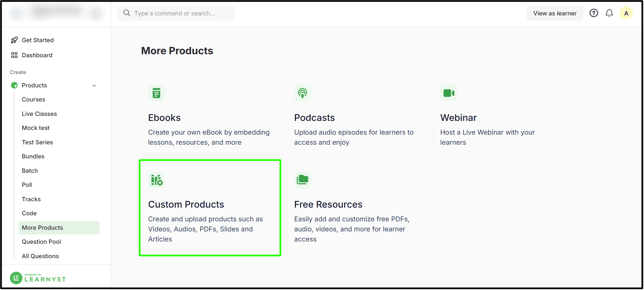
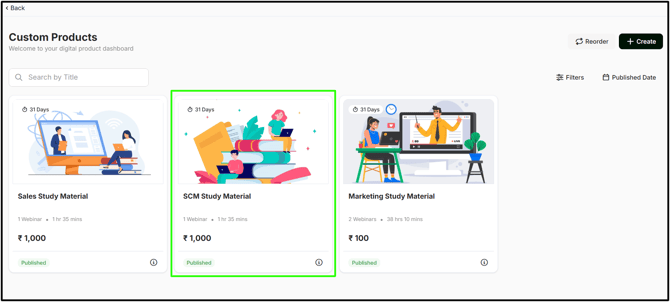
- Choose the desired digital/custom product.
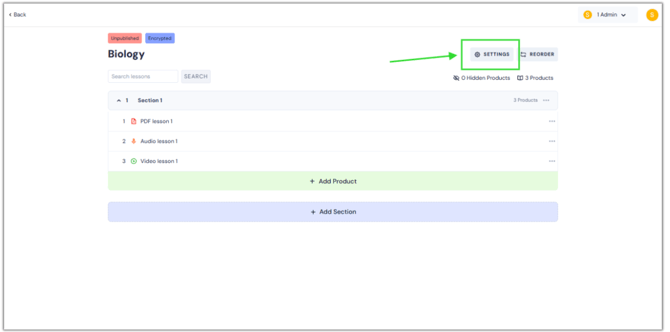
- You'll land on this page. Now, click the Settings button.
- The list of product settings options is displayed here.
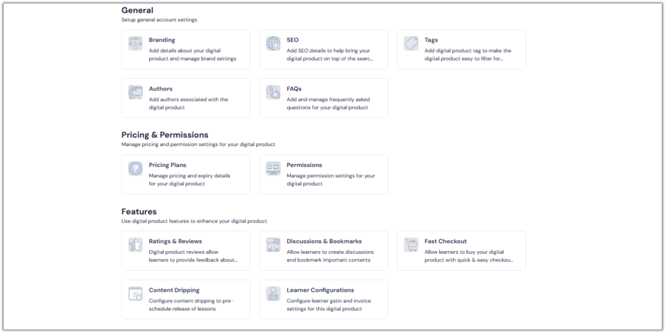
- Branding: You can add details about your digital/custom product and manage brand settings.
- SEO: Add SEO details to help bring your digital/custom product to the top of the search results.
- Tags: Add a tag to make the digital/custom product easy to filter for learners.
- Authors: Add authors associated with the digital/custom product.
- FAQs: Add and manage frequently asked questions for your digital/custom product.
- Pricing & Permissions: Manage pricing and permission settings for your digital/custom product.
- Ratings & Reviews: Digital/custom product reviews allow learners to provide feedback about the digital/custom product.
- Discussions & Bookmarks: Allow learners to create discussions and bookmark important content.
- Fast Checkout: Allow learners to buy your digital/custom product with a quick & easy checkout process.
- Content Dripping: Configure content dripping to pre-schedule the release of lessons.
- Learner Configuration: You can ensure legal compliance, accurate record-keeping, and individual care for students during payment checkout
- Publish digital product: Publish/Unpublish the digital/custom product for your learners.
- Delete digital product: Delete your digital/custom product if you no longer require it.
- Remove Learners: Remove the learner's access from the digital/custom product & remove their data.
- Associated Contents: View all contents your product is associated with. Be it a bundle, segment, category, or subscription plan.