![Learnyst Logo-25-1.png]](https://support.learnyst.com/hs-fs/hubfs/Learnyst%20Logo-25-1.png?height=40&name=Learnyst%20Logo-25-1.png)
Follow the steps below to edit an existing community in your Learnyst admin dashboard:
- Log in to your Learnyst admin dashboard.
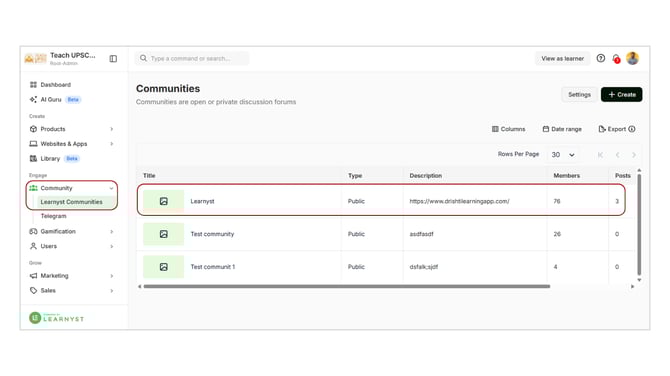
- Go to the Community section.
- Click on Learnyst Communities from the dropdown and click on the community you want to edit.
-
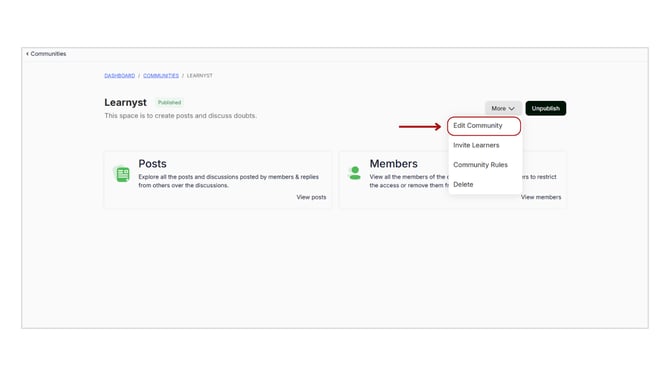
On the community page, click on the More option available at the top-right corner.
-
Click on Edit Community from the dropdown.
Update the required details such as title, description, images, or settings.'
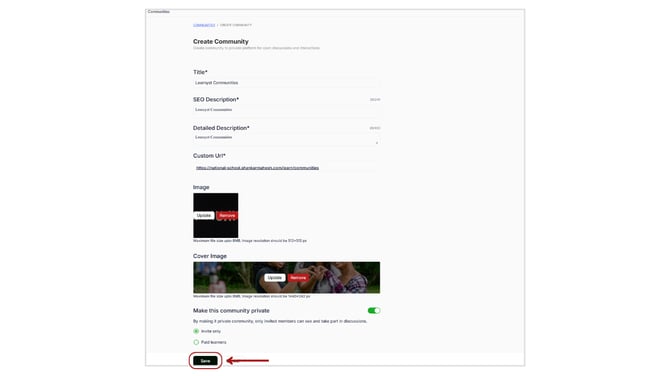
After making the necessary changes, save the updates to apply them to your community.
Editing your community allows you to keep it updated and aligned with your goals, ensuring a better experience for your learners.