![Learnyst Logo-25-1.png]](https://support.learnyst.com/hs-fs/hubfs/Learnyst%20Logo-25-1.png?height=40&name=Learnyst%20Logo-25-1.png)
-
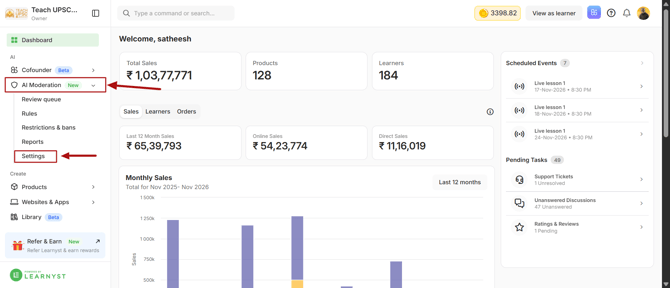
To configure AI Moderation, navigate to AI Moderation → Settings from your Learnyst dashboard.
-
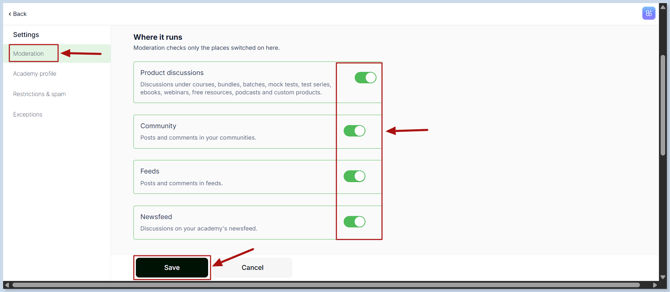
You will land on the Moderation settings page, where you can choose where AI Moderation should be enabled.
-
Select the areas where you want AI to monitor learner-generated content:
- Feeds: Monitor posts shared by learners in the Social Feed.
- Communities: Review learner posts and interactions within communities.
- Product Discussions: Moderate discussions and comments related to your products.
- Newsfeeds: Monitor learner-generated content shared in newsfeeds.
- Once you have selected the required areas, click Save to apply the changes.
-
Your AI Moderation is now enabled for the selected areas, helping you automatically identify and block inappropriate content and maintain a safer learning community.