- To enable default course enrollment, go to Products > Bundles > Desired Bundle.
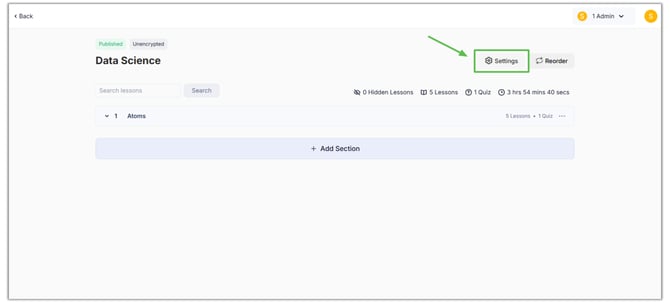
- Then click the Settings button.
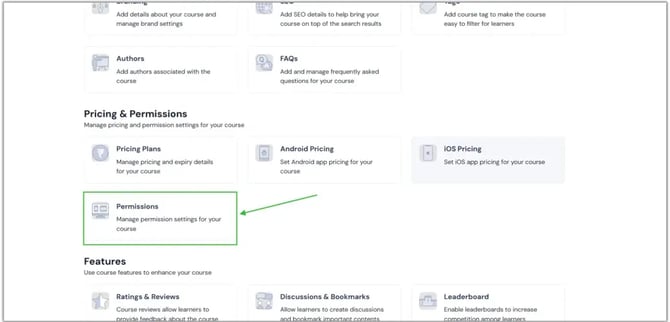
- Select the "Permissions" option under Pricing & Permissions by scrolling down.
- You can now view the Default Bundle Enrollment option. Click here to choose the option. Then, click the Save button.
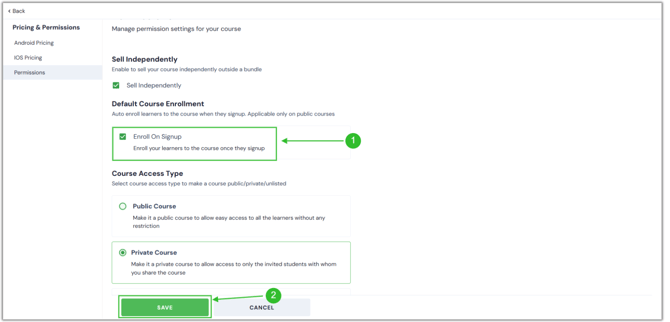
- Now, your learners will automatically enrol in the specified product when they sign up for their account.
- In the same way, you can enable this feature for all of your products, including courses, test series, and mock tests.
English
![Learnyst Logo-25-1.png]](https://support.learnyst.com/hs-fs/hubfs/Learnyst%20Logo-25-1.png?height=40&name=Learnyst%20Logo-25-1.png)