![Learnyst Logo-25-1.png]](https://support.learnyst.com/hs-fs/hubfs/Learnyst%20Logo-25-1.png?height=40&name=Learnyst%20Logo-25-1.png)
Follow the steps below to create a community in your Learnyst admin dashboard:
- Log in to your Learnyst admin dashboard.
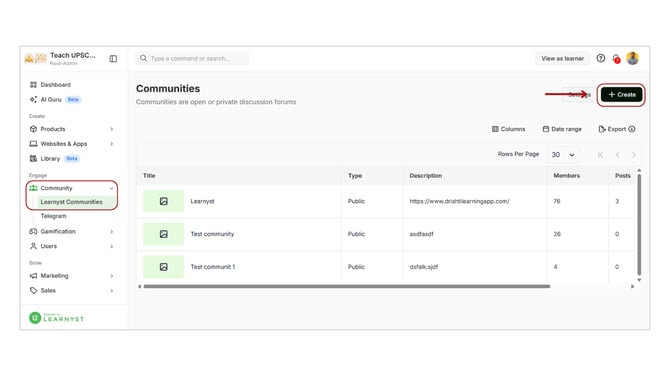
- Go to the Community section from the main menu.
- Click on Learnyst Communities from the dropdown.
- On the Communities page, click on the Create button to start setting up a new community.
Enter Community Details
You will see a form where you need to fill in the following details:
- Title
Enter the name of your community. - SEO Description
Add a short description to help with search visibility. - Detailed Description
Provide a complete overview of your community, including its purpose and what learners can expect. - Custom URL
Set a unique URL for your community page. - Image
Upload an image that represents your community. - Cover Image
Add a banner or cover image for better visual appeal. - Private Community Option
Enable or disable this option based on whether you want your community to be private or public. - Learner Access Configuration
Choose who can join your community:- Sign-up Learners (free access)
- Paid Learners (restricted to paid users)
- Click on Enable Button to enable it & finally click on Save Button to save and create your community online
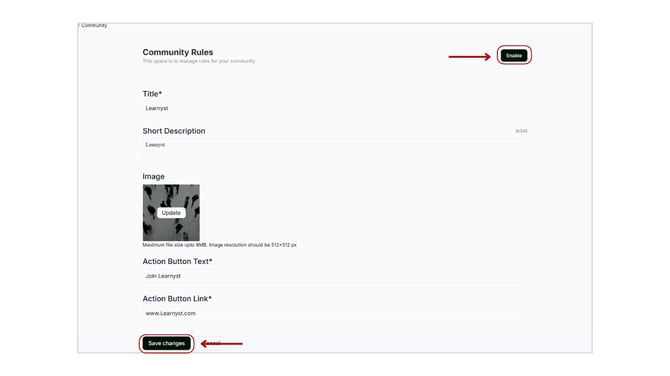
Your community will be successfully created and ready to be Published