![Learnyst Logo-25-1.png]](https://support.learnyst.com/hs-fs/hubfs/Learnyst%20Logo-25-1.png?height=40&name=Learnyst%20Logo-25-1.png)
What are Legal Docs?
Every e-sign contract a learner signs is stored automatically in their own account under Legal Docs, so they always keep a copy and you keep a record. Here is how a learner finds and downloads theirs.
Steps
Step 1 — Open the account menu. The learner clicks their profile, opens Account, then selects Legal Docs from the left menu.
Step 2 — View the contracts list. They see a table of their contracts with columns for Product, Date, Status, Reference Id, and Document.
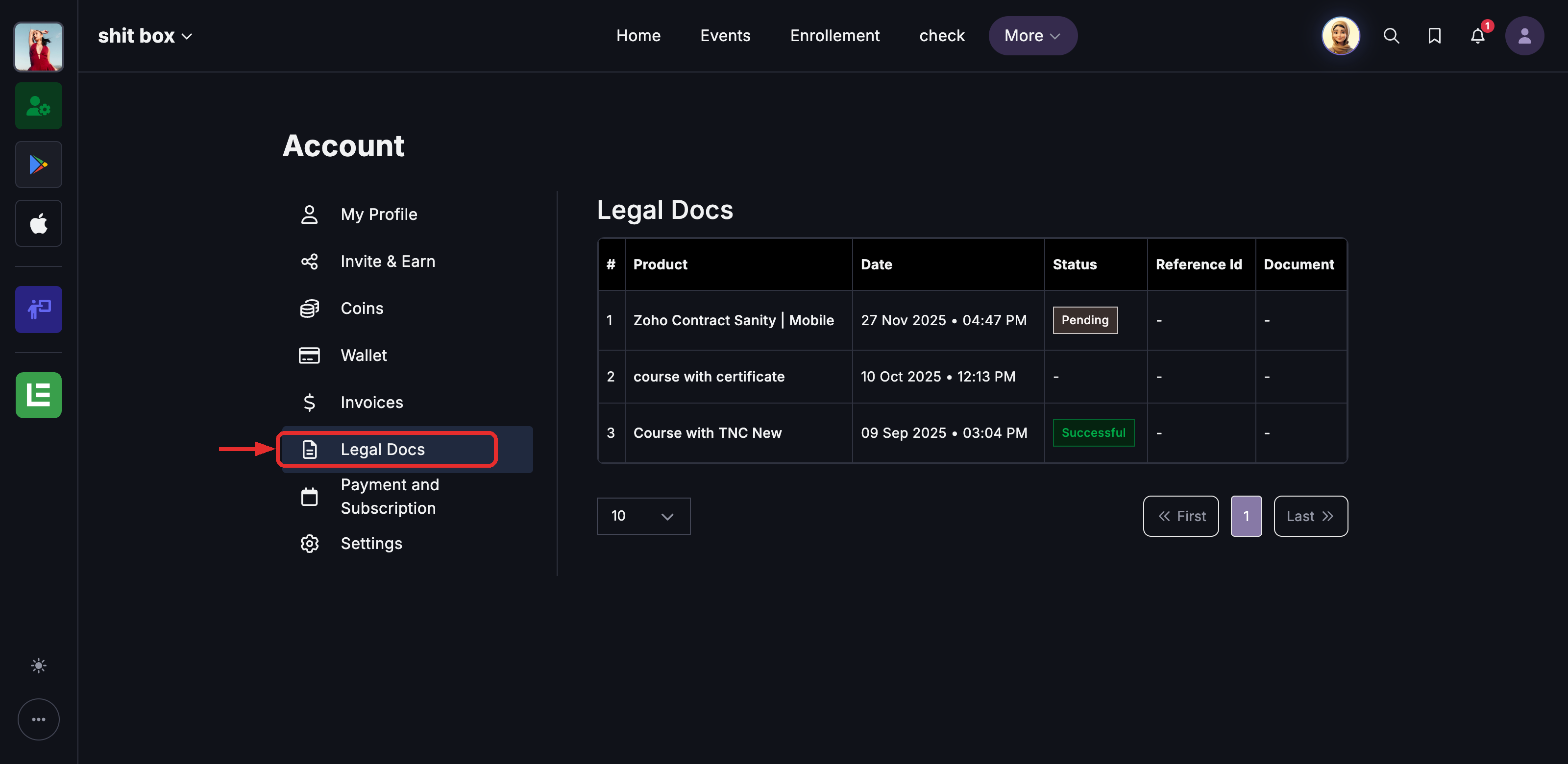
Step 3 — Check the status. The Status shows where each contract stands — Successful means it is signed and complete; Pending means it has not been completed yet.
Step 4 — Download the signed copy. The learner uses the Document column to download their signed PDF.
Note: If a learner has not signed any contract yet, this page will be empty.
E-Sign: Frequently Asked Questions
Do learners have to sign before they can pay?
It depends on the timing you set while creating the pricing plan. With Before Purchase, the Contract row appears on the checkout page and payment stays locked until it is signed. With After Purchase, the learner pays first and is then prompted to sign before they can open the product.
Is Aadhaar verification mandatory?
No. Aadhaar is optional. The learner only sees Aadhaar eSign if you have enabled Digital Verification on the plan. Otherwise they sign with Zoho Sign using a typed, drawn, or uploaded signature.
Where is the signed contract saved?
Automatically to the learner's account under My Account > Legal Docs. You also keep a record on your side, and a copy is emailed when the contract is created.
Can I edit a contract after I have built it?
No. Once you place the signer fields in Zoho Sign and save, you will see "This is the final copy and cannot be edited again." To make changes, create a new contract. You can still edit the Title and Description later from the Details tab — but not the signed document or its Type.
What file can I upload as the contract?
A PDF under 5 MB. You will see "Document added successfully" once it uploads.
Why are the e-sign checkout options not working on my plan?
The plan's payment gateway must be set to Cashfree for the e-sign checkout settings to take effect. Also make sure the contract is Published — only a Published contract can be attached to a plan or sent for consent.
Can I send a contract to learners who already enrolled?
Yes. Open the contract under Users > Legal Documents > Contract, click Request Consent, pick the learners from Learner Enrollments, and send. They are then prompted to complete the e-sign.
Will a learner be asked to sign the same contract twice?
No. Learners who already signed the unchanged contract are not asked to sign it again.
What is the difference between "Esign" and "Terms and Conditions"?
Esign is a full signature contract built in Zoho Sign (the learner signs). Terms and Conditions is a simpler read-and-accept document — the learner just reads and ticks accept, with no signature.
Note: E-Sign is a Beta feature and availability can vary by school or plan.