![Learnyst Logo-25-1.png]](https://support.learnyst.com/hs-fs/hubfs/Learnyst%20Logo-25-1.png?height=40&name=Learnyst%20Logo-25-1.png)
Follow the steps below to invite learners to your community:
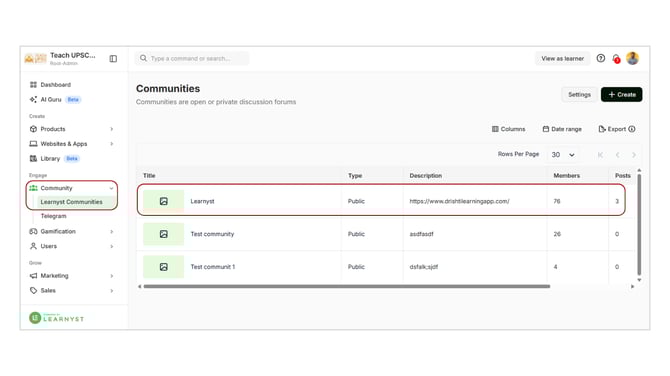
- Log in to your Learnyst admin dashboard, go to the Community section, and click on Learnyst Communities from the dropdown.
- Click on the community where you want to invite learners.
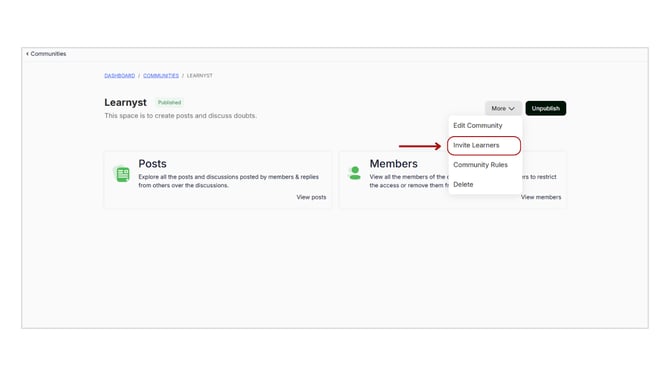
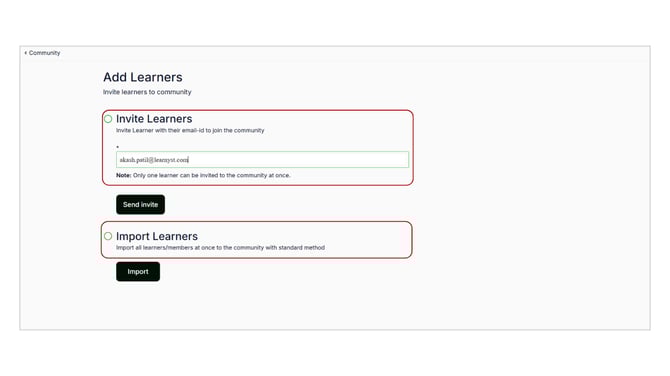
After clicking on the Invite Learner option, where you will get two options:
- Send via Email – Invite a specific learner by entering their email address.
- Import Multiple Learners – Invite multiple learners at once by uploading their details.
- Click on Confirm and send the invitation to add learners to your community.
Inviting learners to your community helps you build engagement, encourage discussions, and create a more interactive learning environment.