![Learnyst Logo-25-1.png]](https://support.learnyst.com/hs-fs/hubfs/Learnyst%20Logo-25-1.png?height=40&name=Learnyst%20Logo-25-1.png)
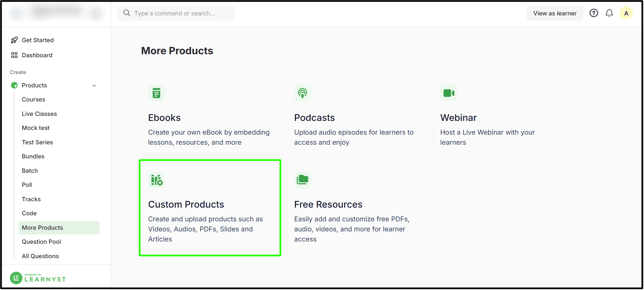
- To configure the lesson settings for the digital product, navigate to Contents > More Products.
- Select the digital product.
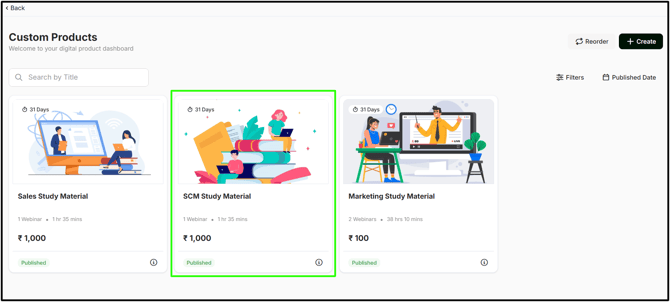
- Choose the lesson you want.
.png?width=670&height=332&name=dele%20les%20DP%20(3).png)
- Click the Settings button.
.png?width=670&height=332&name=dele%20les%20DP%20(5).png)
- By default, you will be in the branding zone.
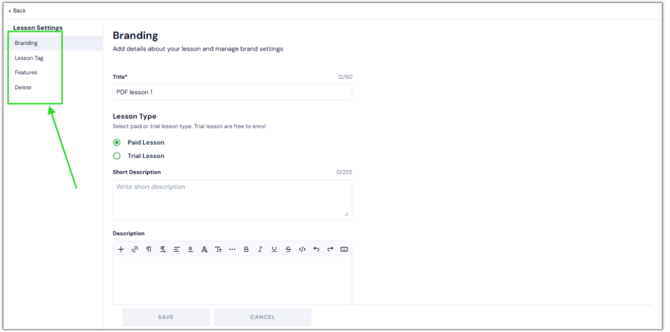
- Branding settings: Add details about your lesson and manage brand settings.
- Lesson Tag: Add a lesson tag to make the lesson easy to filter for learners.
- Features: The lesson URL can be copied and used within the curriculum, newsfeeds, and community posts. Furthermore, you can add QR Codes.
- Delete: Delete your lesson if you no longer require it.
- These settings help your lessons attract a larger audience and are easy to share and find.