![Learnyst Logo-25-1.png]](https://support.learnyst.com/hs-fs/hubfs/Learnyst%20Logo-25-1.png?height=40&name=Learnyst%20Logo-25-1.png)
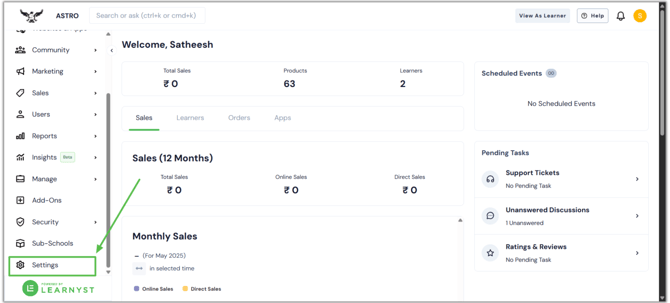
- To integrate the payU Money payment gateway, go to your Admin Dashboard > School Settings
- Click on Payment Gateway when you are inside the school settings.
-png.png?width=670&height=303&name=CC%20avenue%20article%20(1)-png.png)
- Now click on Add Payment Gateway.
-png.png?width=670&height=303&name=CC%20avenue%20article%20(2)-png.png)
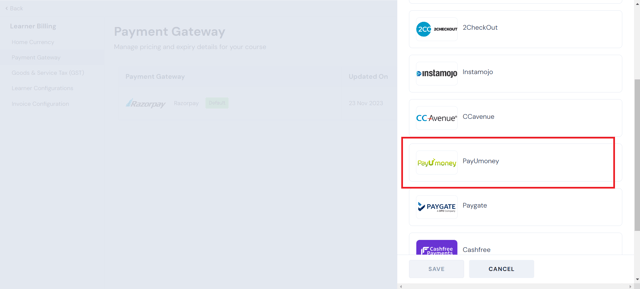
- Scroll down the list and find PayU money as listed payment gateway. Click on Save to complete the final steps.
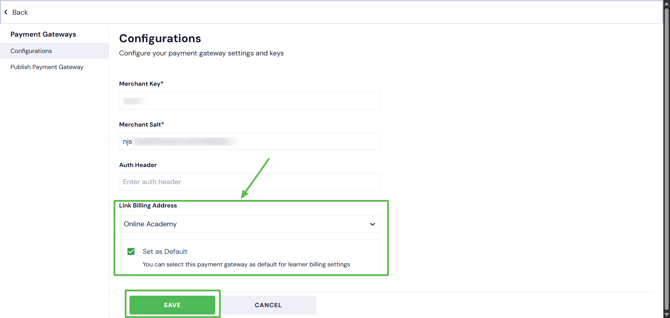
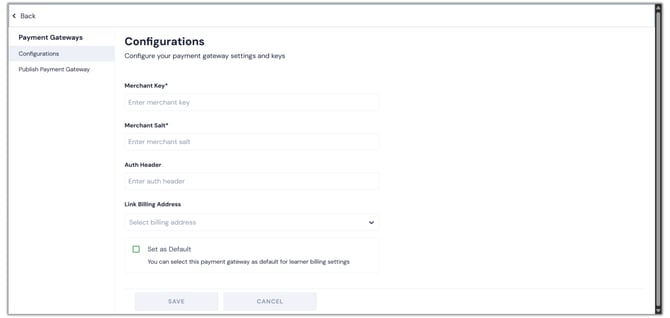
- On the next page, you have to enter your Merchant Key, Merchant Salt, Auth Header, And save it
- To get the Merchant key and Merchant slat, log in to your payU money account and go to the business area.
- Click the Manage Checkout > payment gateway selection here.
.png?width=670&height=318&name=PayU%20money%20payment%20gateway%20integration%20article%20(1).png)
- You can see the merchant key by scrolling down.
- To get the merchant salt codes, click the Generate Salt button. once you have eneter the OTP, you will get the Merchant Salt
- Then, paste them into the appropriate fields after copying them.
.png?width=670&height=318&name=PayU%20money%20payment%20gateway%20integration%20article%20(2).png)
- Select the billing address now.Click the Set as default checkbox and click the Save button to make this gateway the default.