![Learnyst Logo-25-1.png]](https://support.learnyst.com/hs-fs/hubfs/Learnyst%20Logo-25-1.png?height=40&name=Learnyst%20Logo-25-1.png)
- To integrate the PhonePe Money payment gateway, go to your Admin Dashboard > School Settings
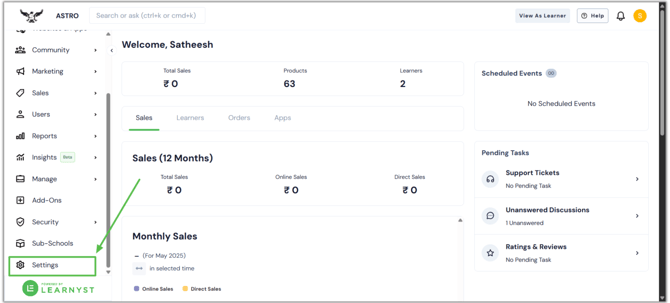
- Click on Payment Gateway when you are inside the school settings.
-png.png?width=670&height=303&name=CC%20avenue%20article%20(1)-png.png)
- Now, click on Add Payment Gateway.
-png.png?width=670&height=303&name=CC%20avenue%20article%20(2)-png.png)
- Scroll down the list and find PhonePe as listed payment gateway. Click on Save to complete the final steps.
.png?width=670&height=318&name=PhonePe%20Integration%20article%20(4).png)
- On the next page, you have to enter your Client ID, Client secret, Client version, etc.
.png?width=670&height=318&name=PhonePe%20Integration%20article%20(5).png)
- To get these Codes, log in to your PhonePe Payment Gateway account and complete the KYC (Know Your Customer) verification, such as business registration, GST, bank details, and address proof.
- Once you have submitted the KYC, you'll receive an email containing your unique Merchant ID (MUID).
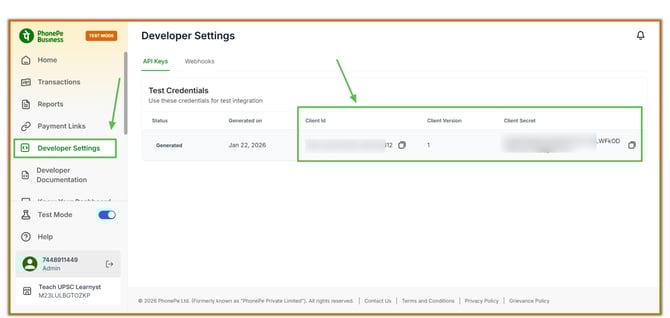
- To get Client ID and secret, go to the Developer Settings selection here.
- Here you can get the Client Id, Client Secret, and Client Version. Copy them and paste them correctly.
- To get the Client Webhook username and password, go to the Webhooks tab and click the Create new Webhook button.
.png?width=670&height=318&name=PhonePe%20Integration%20article%20(1).png)
- To create a webhook
- Webhook URL: Enter your school's URL.
Example: https://api.learnyst.com/learner/v7/webhook/phonepe_webhook - Then enter the Username and password.
- Then enter the description and event
- Webhook URL: Enter your school's URL.
.png?width=670&height=318&name=PhonePe%20Integration%20article%20(2).png)
- Then click the Create button.
.png?width=670&height=318&name=PhonePe%20Integration%20article%20(3).png)
- Now, enter the client webhook username and password correctly, and click the Save button.
.png?width=670&height=318&name=PhonePe%20Integration%20article%20(6).png)
- Once done, navigate to the Publish Payment Gateway and publish it
.png?width=670&height=318&name=PhonePe%20Integration%20article%20(7).png)