Skip to content
English
  • There are no suggestions because the search field is empty.

Publish telegram community for learners

After you've finished creating your telegram, you can publish it. Once you've published your telegram product, students can sign up for it.

  • There are two steps to publishing your telegram for the first time.
Step 1: Publish the pricing plan.
  • To publish the pricing plan, please log in as an admin.
  • You will arrive at the admin dashboard. Then, navigate to Community > Telegram and pick the desired telegram you want to publish.
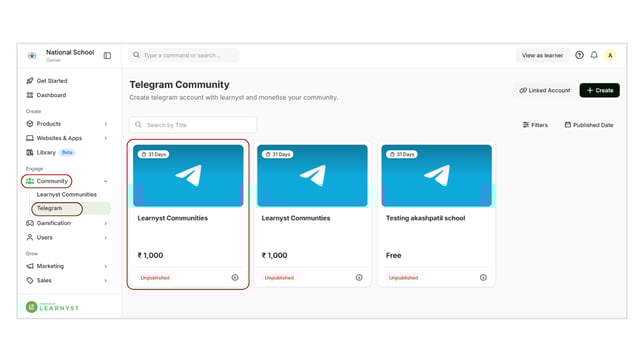
    Publish telegram community for learners step 1
  • It will take you to this page. Now, under Pricing and Permissions, select the Pricing Plans option.

    Publish telegram community for learners step 2
  • Now select the Draft tab. Here, you can view all of your price plans. Click on any plan.

    Publish telegram community for learners step 3
  • You'll arrive at this page. Choose the Publish status option from the left-side menu bar.

    Publish telegram community for learners step 4
  • Now, select the Published option and click the Save button.

    Publish telegram community for learners step 5
  • Now your price plan has been successfully published.

Step 2: Publish the telegram.

  • Return to the settings page after you've published your pricing plan. Now, scroll down and select the Publish Telegram option.
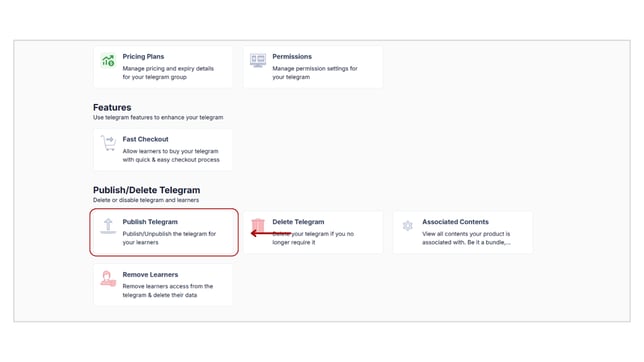
    Publish telegram community for learners step 6
  • Now, select the Live option and click the Save button.
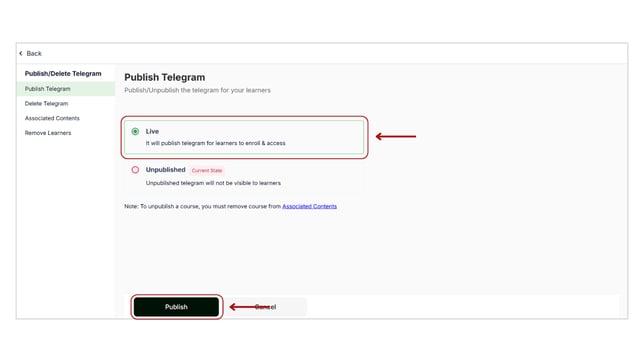
    Publish telegram community for learners step 7
  • Your telegram is now visible to your learners, along with a price plan.