![Learnyst Logo-25-1.png]](https://support.learnyst.com/hs-fs/hubfs/Learnyst%20Logo-25-1.png?height=40&name=Learnyst%20Logo-25-1.png)
- Watch the entire video here, or you can go through each step explained below.
- To Unpublish your Instructor tracks. you can navigate to Admin Dashboard >> Products >> Tracks >> Select the Track.
.png?width=670&height=303&name=Untitled%20design%20(78).png)
- Click on More >> Settings.
-1.png?width=670&height=307&name=Untitled%20design%20(16)-1.png)
- Click on Publish Track.
-1.png?width=670&height=307&name=Untitled%20design%20(17)-1.png)
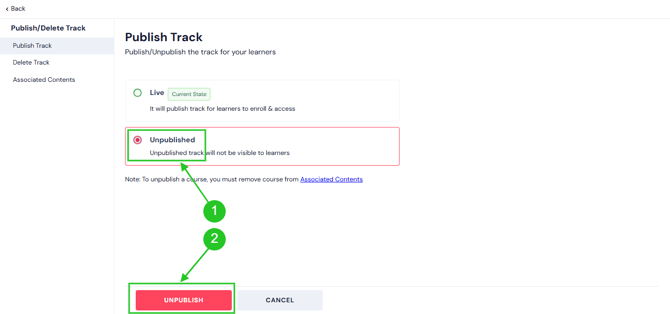
- Select the Unpublished option and click the Unpublish button.
- Carefully read the message from the Popup and enter the Track title again and click on Unpublish.
.png?width=670&height=303&name=Untitled%20design%20(87).png)
- By following these steps, you can easily publish and unpublish the instructor track.