![Learnyst Logo-25-1.png]](https://support.learnyst.com/hs-fs/hubfs/Learnyst%20Logo-25-1.png?height=40&name=Learnyst%20Logo-25-1.png)
-
To reset password, sign in to learner account and navigate to the Store page.
-
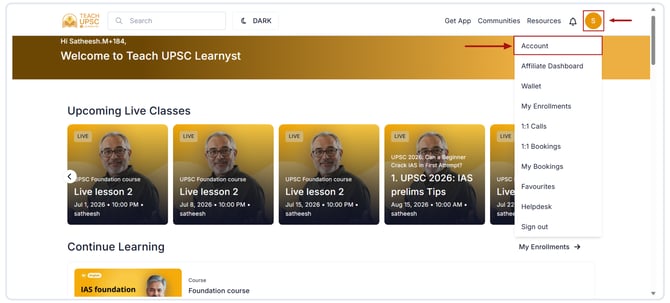
Click Profile icon and select Account.
-
Go to the Settings section and click Reset Password.
.png?width=670&height=303&name=Article%20-%20disable%20%20mails%20(1).png)
-
Enter the following details:
- Current Password
- New Password
- Confirm New Password
- After entering the required information, click Submit.
.png?width=670&height=303&name=Article%20-%20disable%20%20mails%20(2).png)
-
Password will be updated successfully. Use new password the next time to sign in to your account.
Note: If you are already logged in to your account and want to reset your password, you will be asked to enter your current password. You cannot reset your password without entering the current password.
How to Reset Your Password
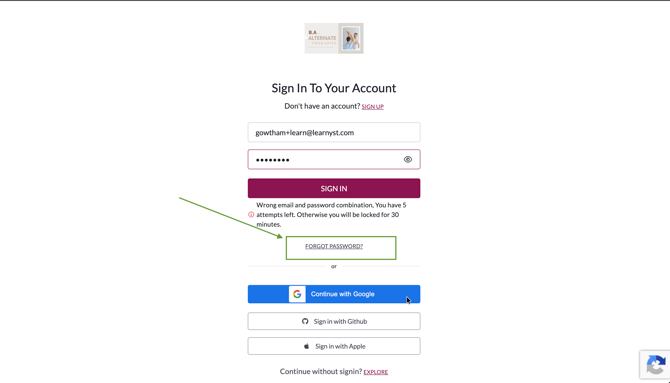
If you have forgotten your password or receive the error message "Wrong email and password combination. You have 5 attempts left. Otherwise, you will be locked for 30 minutes.", your email address or password may be incorrect.
In such scenarios, we recommend resetting your password to regain access to your account immediately and avoid further login attempts with incorrect credentials.
To reset your password and log in using your new password, follow the steps below.
On the login page, click Forgot password? as shown below.
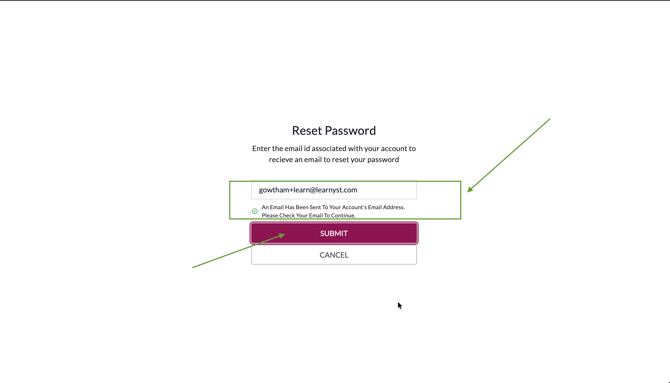
Enter the email address registered with your account and click Submit.
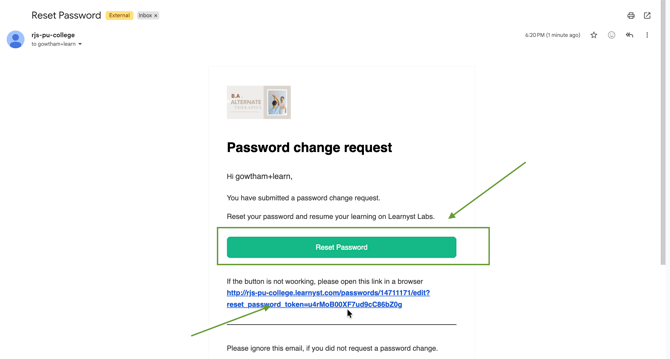
Check your registered email inbox for the password reset email.
Click the Reset Password button in the email.
Re-enter the same password in the Confirm New Password field and complete the password reset process.
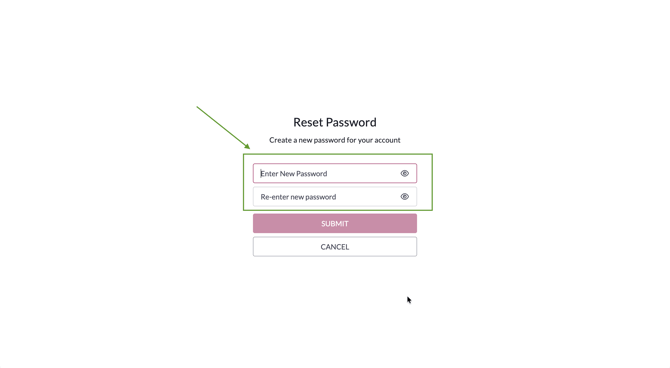
Once your password has been reset successfully, return to the login page and sign in using your registered email address and new password.
Important Notes
- Make sure you enter the correct registered email address when requesting a password reset.
- Avoid repeatedly entering incorrect login credentials, as this may temporarily lock your account.
- If you are already logged in to your account and want to change your password, you will be asked to enter your current password. You cannot change your password without entering the current password.