![Learnyst Logo-25-1.png]](https://support.learnyst.com/hs-fs/hubfs/Learnyst%20Logo-25-1.png?height=40&name=Learnyst%20Logo-25-1.png)
-
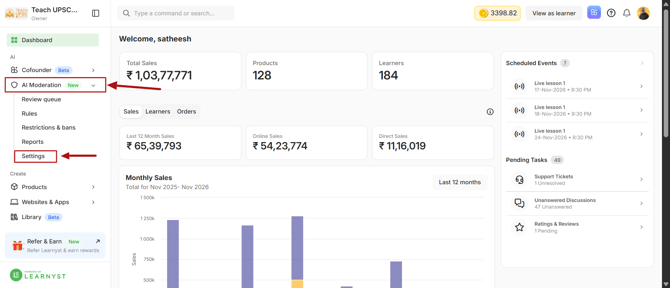
To configure this setting, navigate to AI Moderation → Settings from your Learnyst dashboard.
-
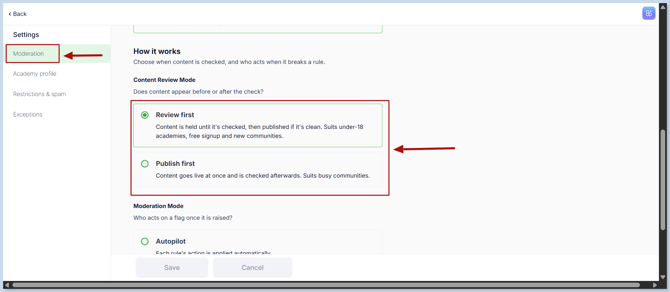
You will land on the Moderation settings page. Here, choose your preferred moderation option:
-
Review First
-
Learner-generated content is reviewed by AI before it is published. Only content that passes the moderation check will be published.
-
This option is recommended for academies with learners under 18, open signups, or newly created communities.
-
-
Publish First
-
Learner-generated content is published immediately and reviewed by AI afterward.
-
This option is suitable for active communities where learners frequently share posts and interact with each other.
-
-
Once you have selected your preferred moderation option, click Save to apply the changes.
-
Your AI Moderation settings are now configured, and learner posts will be handled according to your selected publishing preference.