![Learnyst Logo-25-1.png]](https://support.learnyst.com/hs-fs/hubfs/Learnyst%20Logo-25-1.png?height=40&name=Learnyst%20Logo-25-1.png)
- To set up the time duration for your Quiz navigate to Products > Mock tests > Desired Mock test
- Click the Settings button.
.png?width=670&height=318&name=Learnyst%20mock%20test%20settings%20(1).png)
- Now you can find the Duration Type option under the advanced features. Now select it.
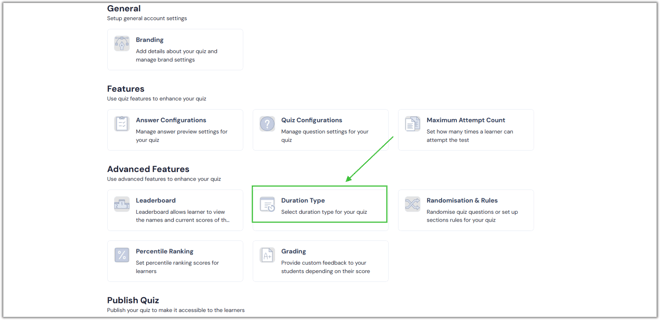
- You can choose from any option on this page.
1. No duration: If you select this option, your quiz has no time limit.
2. Overall quiz Duration: You can specify the time limit for the entire quiz here.
3. Section Duration: If you choose to use this feature, you will need to set a time restriction for each section of your quiz.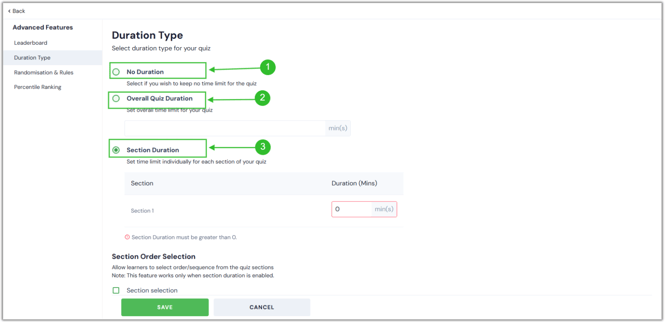
4. Section Order Selection: If you allow this option, a prompt asking your students to select any order will appear before they can begin the quiz. There, the sections are rearranged.
5. Quiz pause: This feature lets your student pause and continue the time.-2.png?width=670&height=322&name=Q.P%20%20imp%20word%20(1)-2.png)
- Click the Save button after making the needful change.
-2.png?width=670&height=322&name=Q.P%20%20imp%20word%20(2)-2.png)