![Learnyst Logo-25-1.png]](https://support.learnyst.com/hs-fs/hubfs/Learnyst%20Logo-25-1.png?height=40&name=Learnyst%20Logo-25-1.png)
- To unpublish the quiz, go tothe desired quiz > now click on the Settings button.
.png?width=670&height=322&name=pub%20quiz%20(1).png)
- You will now arrive at this page. Choose the Publish Quiz option by scrolling down.
.png?width=670&height=322&name=pub%20quiz%20(2).png)
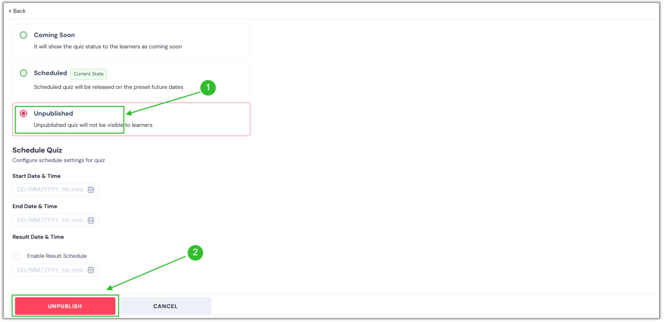
- Now, select the Unpublished option. Then, click the "Unpublish" button.
- Your screen will display the confirmation pop-up once you click the Unpublish button. Enter the name of your quiz here, then hit the Unpublish button.
.png?width=670&height=322&name=unpub%20quiz%20(1).png)
- You have now successfully unpublished your quiz.