![Learnyst Logo-25-1.png]](https://support.learnyst.com/hs-fs/hubfs/Learnyst%20Logo-25-1.png?height=40&name=Learnyst%20Logo-25-1.png)
-
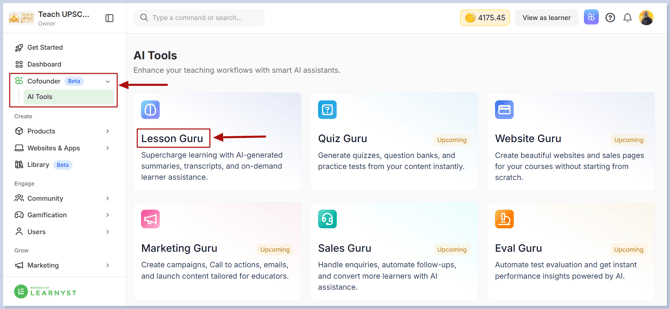
To configure AI Discussions, navigate to AI Co-founder → AI Tools → Lesson Guru
-
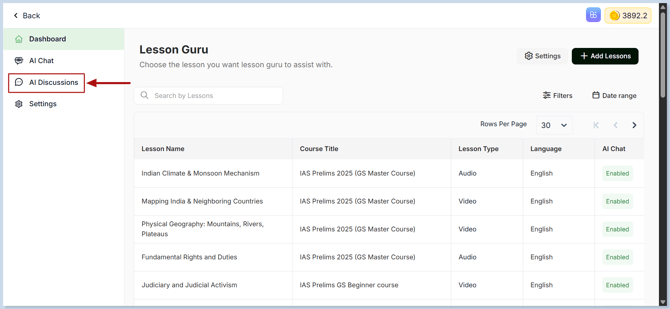
Then, go to the AI Discussions.
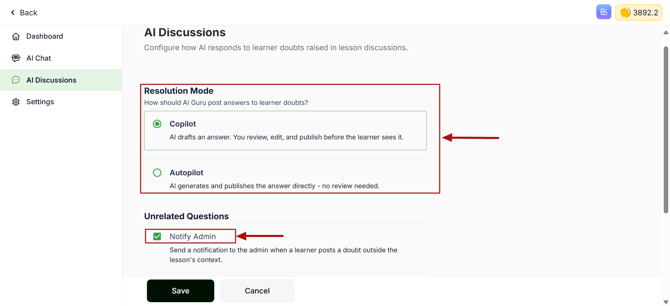
- Choose the resolution mode that best suits your workflow:
- Copilot – AI generates a draft response. You can review, edit, and publish the reply before it becomes visible to learners.
- Autopilot – AI automatically generates and publishes responses without requiring admin approval.
-
If you want to be notified when learners ask questions that are unrelated to the lesson, enable Unrelated Questions Notification.
-
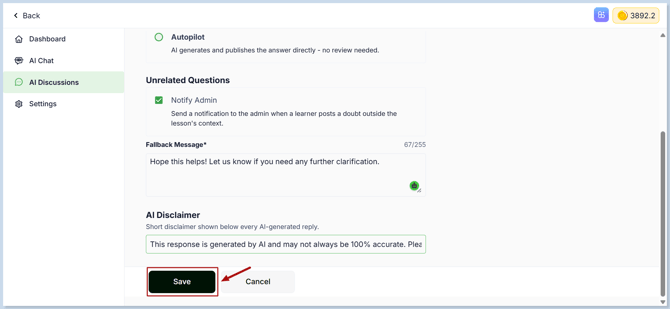
You can also customize the following settings:
- Feedback Message – Display a custom message after AI responds to a learner.
- AI Disclaimer – Inform learners that the response was generated by AI.
- After configuring the settings, click Save.
-
Related Articles - You may also find these articles helpful:
- Select Lessons for Lesson Guru – Enable Lesson Guru for specific lessons.
- Customize the Lesson Guru AI Chat Assistant – Personalize the AI avatar, chatbot name, and chat interface.
- Set Default AI Tools – Configure the default AI features available for all lessons.