![Learnyst Logo-25-1.png]](https://support.learnyst.com/hs-fs/hubfs/Learnyst%20Logo-25-1.png?height=40&name=Learnyst%20Logo-25-1.png)
-
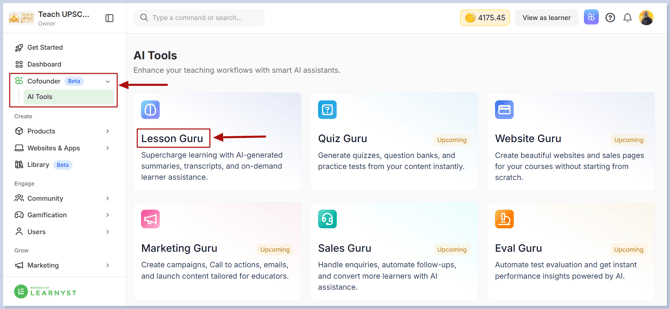
To enable Lesson Guru for Specific Lessons, navigate to AI Co-founder → AI Tools → Lesson Guru.
-
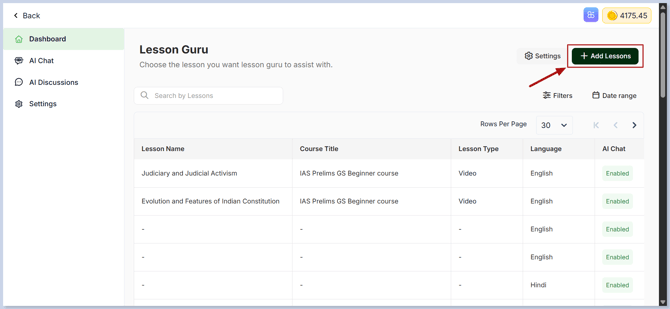
Click Add Lessons.
-
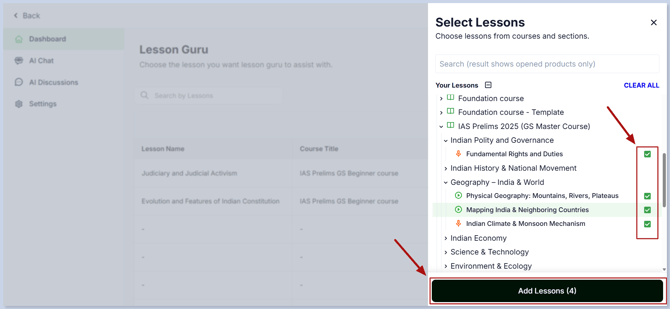
Select the lessons for which you want to enable Lesson Guru and click Add Lessons.
-
Choose the language spoken in the lesson. This helps the AI accurately transcribe and process the lesson content.
-
Enable the AI features you want learners to access:
- AI Chat – Allows learners to ask questions and receive AI-powered answers based on the lesson.
- AI Summary – Automatically generates a concise summary of the lesson for quick revision.
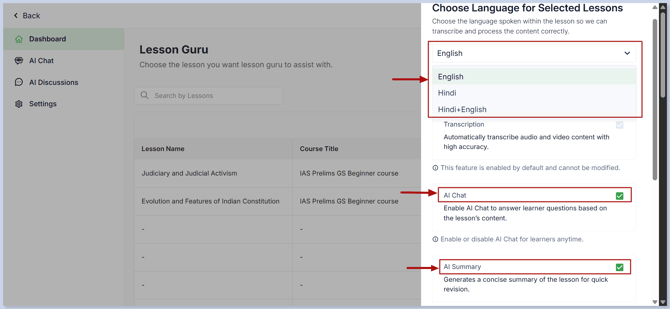
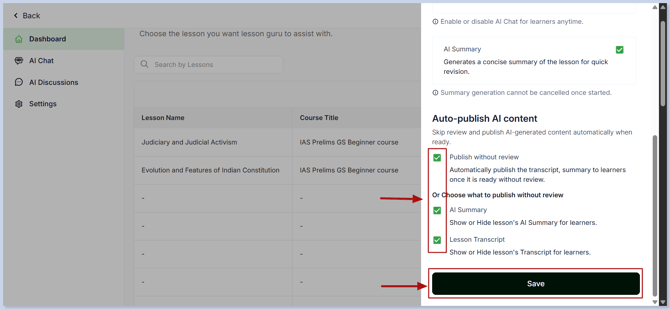
- If you want the AI to answer learner questions immediately without requiring your review, enable Publish Without Review.
-
After configuring the required settings, click Save.
-
Related Articles - You may also find these articles helpful:
- Customize the Lesson Guru AI Chat Assistant – Personalize the AI avatar, chatbot name, welcome message, and behavior.
- Configure AI Discussions – Set up AI-powered responses for learner discussions using Copilot or Autopilot mode.
- Set Default AI Tools for Lessons – Choose which AI features, such as AI Chat and AI Summary, are enabled by default for new lessons.