![Learnyst Logo-25-1.png]](https://support.learnyst.com/hs-fs/hubfs/Learnyst%20Logo-25-1.png?height=40&name=Learnyst%20Logo-25-1.png)
Add Sources to Train Your AI
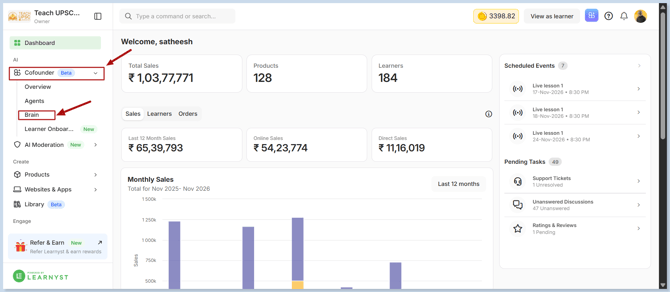
- From your Learnyst dashboard, navigate to Co-founder > Brain.
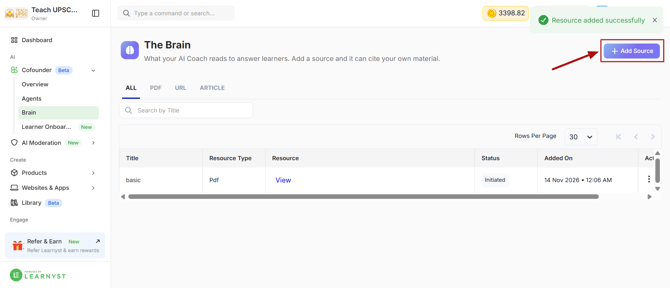
- Click Add Source.
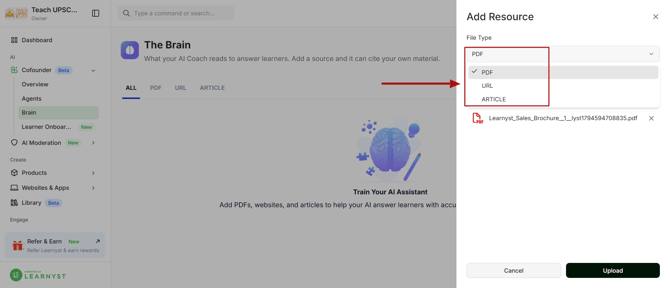
- Add information about your academy using any of the supported source types:
- PDF: Upload documents containing information about your academy.
- URL: Add links to relevant websites or web pages.
- Article: Add articles with useful information for your learners.
- Once you've added your sources, click Upload.
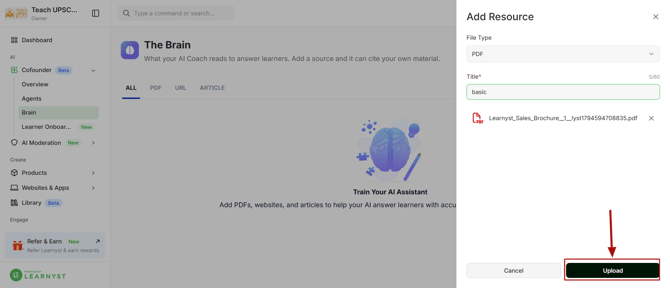
Your AI Assistant will use the information from these sources to understand your academy and guide learners with relevant answers to their questions.